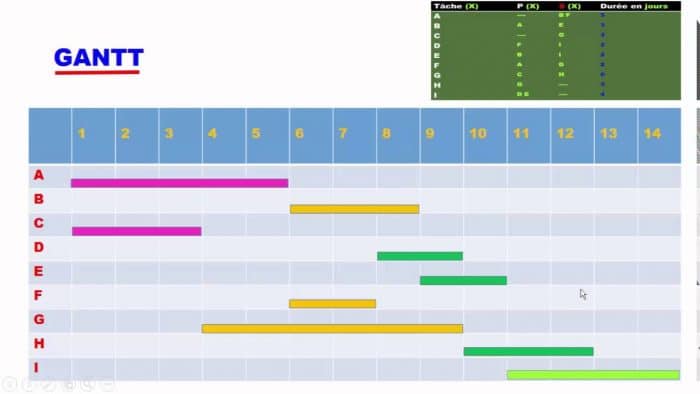
If you are managing a personal or professional project, or if you are the leader of a startup or a large company, planning must be an integral part of your daily routine. Indeed, with all the monitoring that falls on you and all the management of activities related to your position, it is necessary to establish a strategy to successfully carry out the tasks assigned to you.
One planning tool that has stood out due to its practicality and ease of implementation is the Gantt chart. Today, it is the solution adopted by almost all players in the project management world. Let’s explore what generates so much enthusiasm for this tool as a planning device.
The Gantt Chart and Its Advantages
 Invented in 1910 by Henry Gantt, the Gantt chart is a planning tool used in scheduling and project management. It is presented in the form of a graph indicating the various stages of a project in its entirety. A project consists of activities subdivided into tasks, and the Gantt chart provides a visual representation of these tasks in the form of a histogram where each task is represented by a bar.
It also allows you to visualize the start date, end date, duration, and level of execution of each task that makes up the project, as well as the human, material, and budgetary resources assigned to each of them. Thus, it is clear that the strength of this organizational tool lies in the visual aspect of the sequence of activities it displays.
Indeed, this visibility facilitates understanding and even allows a novice to appreciate at a glance the project’s progress. Moreover, it is important to note that this chart highlights overlapping activities. In this way, the project administrator has a precise idea of all ongoing activities, and if they notice delays, they can redirect resources to correct the course.
How to Implement a Gantt Chart?

There are many tools to create a Gantt chart. At one time, Gantt charts were drawn by hand. But today, with advances in technology, several software programs have been developed to facilitate the creation of the graph corresponding to your project. Already with Microsoft Excel, you can set up an automated chart that presents all the information related to your project. For those of you who want to understand everything you need to know to develop the Gantt chart in Excel, we recommend this reference article published on apprendreexcel.com. You will find all the information related to this chart, from its usefulness to the formulas to use for implementing it in Excel, as well as a pre-designed template that you can download for free and customize as you wish.
Some Limitations of the Gantt Chart
It is a strength to recognize one’s limitations, they say. For this reason, we can outline two points regarding the weaknesses associated with the Gantt chart. Thus, on one hand, to track the updated progress of the project, the Gantt chart requires regular updates, and on the other hand, potential display issues may arise when printing the chart associated with very complex projects.